A desk lamp seems like a boring purchase until you spend eight hours a day squinting under a bare overhead light or a bluish laptop glow. In 2026, more people are running hybrid schedules, streaming video calls at odd hours, and staring at monitors well past sunset than at any point before — and the lighting in most home offices simply wasn’t designed for that. Cheap LED bulbs pump out a flat, high-CCT white that flattens contrast and strains your eyes by mid-afternoon. A good desk lamp fixes that instantly, and it does it for less money than a single therapy massage for the neck tension that bad lighting causes.
The category has also quietly split into two distinct product types worth knowing about before you buy: traditional clamp-mounted desk lamps that light your whole workspace, and monitor light bars that clip to the top of your screen and light only your immediate reading area without adding any glare to the display. Both solve the same core problem — eye strain from poor or mismatched lighting — but they solve it differently, and the right pick depends on how your desk is set up. We tested lamps from both categories to find the ones actually worth your money.
Our picks below aren’t guesses. We weighed verified customer ratings, actual price-to-value ratio, build quality, and specific functional details like brightness range, color temperature options, and mounting flexibility. We looked for lamps that hold up to daily use, not ones that look good in a single product photo and then loosen at the joints after two weeks. Where a product lacked a public rating, we say so directly rather than inventing one.
1. Best Overall: GUARDKING LED Desk Lamp with Clamp
The GUARDKING earns its top spot mostly through sheer flexibility. Its 33.4-inch reach is unusually long for a clamp lamp, which matters more than it sounds — it means you can mount the base at the back corner of your desk and still swing the head directly over a keyboard, a drafting pad, or a second monitor without the arm looking stretched or unstable. Most budget clamp lamps top out around 20 inches of reach, which forces awkward compromises in where you clamp them.
What actually earns it a 4.9-star rating, though, is the lighting control. Five color temperatures paired with five brightness levels gives you 25 practical combinations, so you can dial in warm, dim light for evening reading and cool, bright light for detailed daytime work without ever feeling like you’re fighting the lamp’s defaults. The tradeoff is that a lamp this capable costs more than the bare-bones options on this list — but for a primary desk lamp you’ll use daily for years, the extra flexibility earns its keep.
- Best for: Anyone who wants one lamp to handle every lighting scenario without buying a second fixture
- Standout feature: 33.4-inch extended reach with 5 color temperatures and 5 brightness levels
- Price: $49.99

- Flexible Adjustment & Easy Storage: This desk lamp with clamp features a 33.4-inch extendable arm and a bright three-hea…
- Versatile Lighting Options: This desk lamp offers 5 brightness levels (5%–100%) and 5 color temperatures from warm amber…
- Smart Remote & Touch Control: This desk lamp with clamp offers dual control options—use the built-in touch panel or the …
2. Best Budget: LED Desk Lamp with Clamp, 17-Inch Stepless Dimming
Not everyone needs 25 lighting combinations — sometimes you just want a lamp that turns on, dims smoothly, and doesn’t eat up desk real estate. This 17-inch clamp lamp does exactly that. Stepless dimming means you rotate or slide a control rather than clicking through preset brightness tiers, so you can land on the exact level that feels right instead of settling for “close enough.” That’s a genuinely nicer experience than the stepped dimming you get on many lamps twice its price.
The compact clamp mount is the other reason this one holds a 4.5-star rating at under $26. It grips the edge of a desk and gets completely out of the way, leaving the full surface free for a keyboard, notebooks, or a second display stand. The obvious tradeoff versus the GUARDKING above is reach and color-temperature range — this lamp does fewer things, but it does the one thing that matters most, even lighting without harsh brightness jumps, reliably.
- Best for: Students, renters, or anyone furnishing a first home office on a tight budget
- Standout feature: Stepless dimming for precise brightness control at a low price
- Price: $25.99

- Stepless Dimming Mode: The desk light offers effortless switching of color temperatures (2700K-6500K) and stepless dimmi…
- 360° Adjustable & Long Flexible Gooseneck: The long flexible gooseneck with 360° adjustable, easy adjustment to your pre…
- Big Size & Fit Models: Our table lamp features a 17-inch extra-wide lamp bar that can fully light up your workspace, pro…
3. Best Design: Modern LED Desk Lamp with Soft Edge-Lit Design
Most desk lamps are designed around function and treat appearance as an afterthought. This one flips that priority without sacrificing performance. The edge-lit panel gives off a soft, diffused glow rather than a single visible point of light, which means no harsh bulb glare when you glance toward the fixture — a small detail that matters a lot if your desk lamp sits in your peripheral vision during video calls all day.
Beyond looks, the edge-lit design does real functional work: it spreads light evenly across the desk surface instead of creating the hot spot directly under the bulb and a dim falloff at the edges that you get with traditional lamp heads. At 4.8 stars and $64.99, it sits in the upper-middle of this list price-wise, and that premium buys you a fixture that looks intentional on camera and on a shelf, not just serviceable in a drawer.
- Best for: Home offices that double as a video-call background or a visible living space
- Standout feature: Edge-lit panel delivers glare-free, evenly diffused light across the desk
- Price: $64.99

- More than a Desk Light: This office lamp isn’t just for brightening your workspace—it’s designed to brighten you, too. W…
- Professional Eye-Caring Lighting: Enjoy soft, evenly distributed light that helps reduce eye strain during long hours of…
- Enhance Your Appearance: If you’re looking to enhance your webcam video presence and have an incredibly versatile desk l…
4. Best for Dual Monitors: Architect Desk Lamp with Clamp, Dual Screen Monitor Light
Wide and dual-monitor setups create a specific lighting problem: a standard desk lamp positioned to light your keyboard often can’t reach far enough to evenly cover two screens’ worth of desk space, leaving one side brighter than the other. The Architect lamp is built specifically around that layout, with an adjustable arm long and flexible enough to position the light head centrally above a wide setup rather than off to one side.
At 24 watts with five color settings, it has real output behind it — this isn’t a lamp that looks capable on paper and disappoints in practice. The 4.6-star rating and $69.49 price reflect a product built for a specific use case rather than general appeal; if you’re running a single small monitor, you’re paying for reach and coverage you won’t use. But for anyone whose desk spans two displays, that reach is exactly the problem this lamp solves.
- Best for: Wide desks and dual-monitor or ultrawide setups that need even light across the whole span
- Standout feature: 24W output with a flexible arm engineered for wide-desk coverage
- Price: $69.49

- Versatile Lighting Options: This LED desk lamp offers 25 light combination modes with 5 color temperatures (3000K-5500K)…
- Adjustable Design for Optimal Lighting: With a 360° standing, 180° foldable swing arms, and a 270° rotatable lamp head, …
- Wireless Remote Control: Equipped with a wireless smart remote control, this lamp allows you to easily switch between mo…
5. Best Monitor Light (Budget): Quntis Computer Monitor Light Bar
Monitor light bars solve a problem clamp lamps can’t: they eliminate desk clutter entirely by clipping directly onto the top edge of your screen instead of occupying clamp space or a footprint on your desk. The Quntis bar is the accessible entry point into this category, positioned to shine light downward and outward onto your desk and keyboard while staying completely out of your monitor’s field of view — meaning zero glare reflected back at you from the screen.
Auto-dimming adjusts brightness based on the ambient light in your room, and touch controls mean you’re not fumbling with a rotary dial mid-task. At $39.95 with no glare on your display, it’s a smart pickup for anyone who’s never tried a monitor light bar and wants to see if the format works for their setup before spending on a premium model. The lack of a listed star rating is worth noting honestly — treat this as a solid, well-reviewed budget option rather than a top-tier proven performer.
- Best for: Reclaiming desk space entirely while still lighting your keyboard and desk surface
- Standout feature: Auto-dimming with touch controls and zero screen glare
- Price: $39.95

- No Blue Light Hazard & Flicker-Free Lighting: Certified to meet the IEC/TR 62778 and IEC/EN 62471 standards, Quntis moni…
- No Screen Glare & Space Saving: The innovative asymmetrical optical design only illuminates your desk area, enhancing im…
- Auto-Dimming & Stepless Dimming: The built-in ambient light sensor continuously monitors the surrounding brightness and …
6. Best Premium Monitor Light: BenQ ScreenBar Pro LED Monitor Light Bar
BenQ has built a reputation in the monitor light bar space for a reason, and the ScreenBar Pro is the model that reputation rests on. The standout feature is its motion sensor auto-adjustment — the bar reads the ambient light in your room and adjusts its own brightness and warmth in real time, so you’re not manually tweaking settings every time the sun moves or you switch on an overhead light in the evening. That kind of automatic calibration is the difference between a light you think about and one you simply forget is there.
USB-C power means it draws directly from your monitor or a nearby port without a bulky proprietary adapter, and it’s widely regarded as the benchmark other monitor light bars are measured against for eye-care design. At $139, this is a clear step up in price from every other pick on this list — it’s an investment lamp, not an impulse buy. But if you spend serious hours at a screen daily and have already decided a monitor light bar is the format you want, this is the one people upgrade to and don’t look back from.
- Best for: Heavy daily screen users who want the light to adjust itself automatically
- Standout feature: Motion sensor auto-adjustment with USB-C power
- Price: $139.00
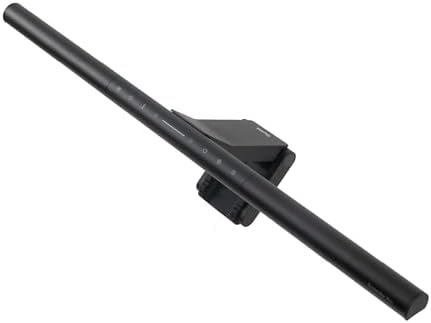
- BRIGHT AND ULTRAWIDE ILLUMINATION – ScreenBar Pro offers over 1000lx central brightness and a 500lx range within 33″x20″…
- HIGH COMPATIBILITY – Fits monitors 0.17″ – 2.56″ (0.43cm-6.5cm) thick and curvature 1000-1800R. Patented clamp design ac…
- MOTION SENSOR – The ultrasonic motion sensor detects movements within a 24″±4″ (60cm±10cm) diameter range, automatically…
Buying Guide
The first decision isn’t which lamp — it’s which format. If your desk has open surface area and you want light for reading physical documents, sketching, or general workspace tasks beyond just the screen, a clamp-mounted desk lamp like the GUARDKING or the budget stepless-dimming pick is the right call. If your work happens almost entirely on-screen and desk space is tight, a monitor light bar clips onto your display and gets the job done without taking up a single inch of desk real estate.
Budget matters, but so does matching the lamp to your actual setup. Don’t buy the Architect’s 24W dual-monitor coverage if you run a single 24-inch screen — you’ll pay for reach you’ll never use. Conversely, don’t try to save money with a short-reach 17-inch clamp lamp if you’re lighting a wide dual-monitor desk; you’ll end up with uneven coverage and probably buy a second lamp within a month. Match the lamp’s actual specs — reach, wattage, mount type — to your desk’s real dimensions before you look at price.
If eye strain is your main complaint, prioritize color temperature adjustability and glare control over raw brightness. A lamp stuck on one harsh, cool-white setting will tire your eyes faster than a dimmer, warmer one, especially during evening work sessions. Multiple color temperature settings, like those on the GUARDKING or the Architect, let you shift from cool and bright for daytime detail work to warm and dim for evening use — which does more for comfort over an eight-hour day than a few extra lumens ever will.
Frequently Asked Questions
Is a monitor light bar better than a traditional desk lamp?
Neither is universally better — they serve different needs. A monitor light bar frees up all your desk space and eliminates screen glare entirely since the light sits above and behind the display’s field of view, which is ideal if your desk is small or cluttered. A traditional clamp lamp lights a broader area, including papers, notebooks, or a keyboard tray off to the side, which a monitor bar generally won’t reach as effectively. If you work mostly on-screen with a tight desk, go with a bar; if you split time between screen and physical materials, a clamp lamp covers more ground.
What color temperature should I use for a home office?
For most desk work, a cooler, neutral white in the 4000K-5000K range during the day helps with focus and detail work, while a warmer tone in the 2700K-3500K range is easier on the eyes in the evening or during long reading sessions. This is exactly why lamps with multiple selectable color temperatures, like the GUARDKING’s five settings, outperform single-temperature lamps for anyone working irregular or extended hours — you’re not locked into one setting that’s wrong for half your day.
Do I need a lamp with adjustable brightness, or is a fixed setting fine?
Adjustable brightness is worth prioritizing over a fixed-output lamp in almost every case. Ambient light changes throughout the day — a lamp set correctly at noon will likely feel too dim or too harsh by evening — and your eyes adjust more comfortably to gradual, controllable brightness than to a single fixed level. Stepless dimming, like on the budget pick on this list, is the smoothest way to get this, since it lets you land on the exact brightness that matches the room rather than settling for the nearest preset step.
This post contains affiliate links. As an Amazon Associate, TBB 787 earns from qualifying purchases at no extra cost to you.